Navigating Mediatr
Overview
Section titled “Overview”The MediatR site is organised by in large through the separation of transaction types.
See Transaction Processing Overview for a brief guide or MediatR Glossary for the meanings of transaction types.
Navigation through the MediatR site we hope is obvious, intuitive, and convenient and can typically be achieved in one of three ways:
- Menu Bar Navigation; via the menu bar at the top of all pages
- Footer Navigation; via links in the footer of all pages
- Home Page Navigation; via links on the home page.
Menu Bar Navigation
Section titled “Menu Bar Navigation”The menu bar at the top of the screen contains the following links.

This is the page you see when you first log on. There are links to all the individual transaction types from here.
Transactions
Section titled “Transactions”You can select categories (Inpatient Medical Claims, etc.) from the left of the list, and then a particular claim type from the right, e.g. IMC Claims.
User Guides
Section titled “User Guides”Links to these guides.
Profile
Section titled “Profile”The contains information about your user account, e.g. Organisation name, Location Minor ID, Permissions and Paid modules.
Logout
Section titled “Logout”Select this at the end of your session, particularly if you are using a shared computer.
Footer Navigation
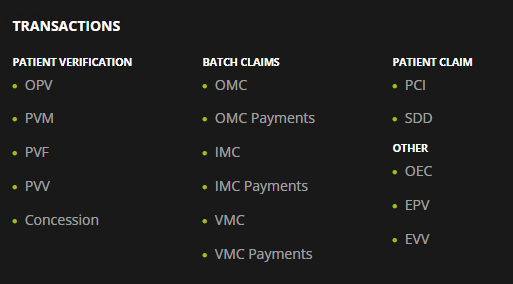
Section titled “Footer Navigation”There are also direct links to all the transaction types via the footer.
Was this guide helpful?
Help us make these instructions clearer and more useful.
Opens an email to Healthinc support with this page linked. No rating is stored automatically.